Hack Diary: Natural Language Queries of Data Using a Semantic Layer
Recently, my team at Autotrader ran a hack on ways to improve the experience of the data platform for our colleagues. The aim of this hack wasn’t necessarily to produce production-ready software, but to give the team exposure to AI-based workflows and semantic layers. One of the biggest pain points we have is that we have a lot of data, dashboards and reports and it can be hard to find the right one. Especially in meetings where sometimes someone will ask “How many X did we have last week?” and then someone might have to step back from the conversation and find the right dashboard by which point the meeting has already moved on.
Building and querying a semantic model
There are lots of semantic layer vendors available but we wanted something lightweight that could be easily integrated with a Python web app for the purposes of the hack. We ended up with a ORM like approach similar to sqlalchemy declarative.
A semantic model looks a bit like this:
class Penguins(Model):
    __source__ = (DuckdbSource.from_path("./penguins.parquet"),)
    species: Dimension = dimension(lambda t: t.species, description="Also known as type")
    island: Dimension = dimension(lambda t: t.island)
    bill_length_mm: Dimension = dimension(lambda t: t.bill_length_mm)

    penguin_count: Measure = measure(lambda t: t.count())

    average_bill_length_mm: Measure = bill_length_mm.measure(lambda d: d.mean())
Here, dimensions are categorical fields and measures are aggregations. The model also supports simple join relationships.
The semantic model could then be queried using a simple query builder which we can later expose as a tool call for the LLM. For example if you wanted to know the number of penguins by species you can do:
    sl.query_model(
        Penguins,
        dimensions=[Penguins.species],
        measures=[Penguins.penguin_count],
    ).to_pandas()
# Output:
# species  penguin_count
# Adelie  152
# Chinstrap  68
# Emperor  124
Hooking up Gemini
We use GCP at Autotrader so Gemini Enterprise Agent Platform was a natural choice here to get something up and running. The basic execution flow was to take the natural language query, pass it to Gemini which would then call our query builder tool to generate a query and then return the results:
flowchart LR
    A[User] -->|Natural Language Query| B[Gemini]
    B -->|Call Tool| C[Query Builder]
    C -->|Generate Query| D[Semantic Model]
    D -->|Execute Query| E[Semantic Layer]
    E -->|Return Results| B
    B -->|Return Results| A
The semantic layer templates into the tool’s schema the permitted models, measures and dimensions so the LLM isn’t able to hallucinate dimensions and measures that do not exist. We also give feedback to the LLM if the query was invalid so it can try again.
Building an interface
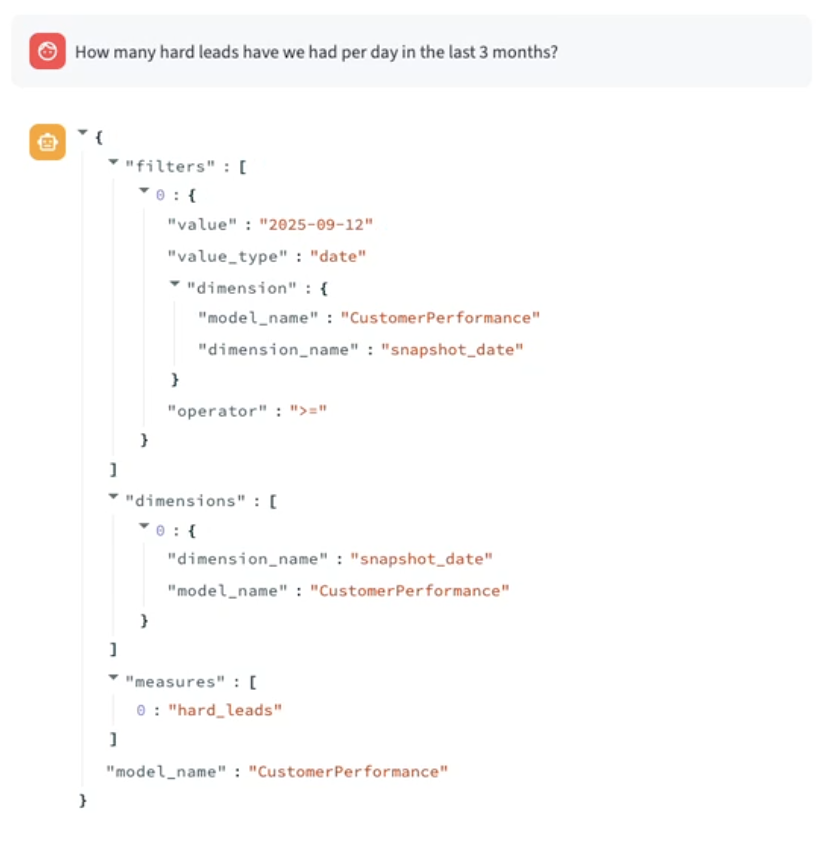
We only had 3 days for the hack so had to get something demonstrable up and running fast! We ended up with a Streamlit app that would expose a simple chat interface to the LLM. The interface would output a representation of the query so you could verify it had done the right thing and then the results of the query as a table:
What’s next?
From this hack we learned that LLMs can easily be hooked up to a semantic layer to allow natural language queries of data in our data platform. The positives of this approach is that the LLM is constrained by the semantic model and so is more likely to generate the correct query than if it was just given the schema of our data. Cube offers this feature in its Semantic Layer offering already as well and the open semantic interchange has been designed around giving AI context about the semantic model from the start. We’re keen to start integrating agentic analytics on top of our data platform so questions can be answered quickly and accurately without having to open up BigQuery or Looker.