
Overview
Data Joinery is a small framework that allows you to build complex transformation jobs with an emphasis on testability. It helps you break apart complex transformations into testable units, whilst allowing you to annotate these transformations with the upstream/downstream schemas. Without a schema contract, a transformation might be declared as:
From this we have no idea what the inputs or outputs of the transformation are. With Data Joinery you can make it much clearer:
import polars as pl

from data_joinery import Strict, transform


@dataclass
class Customer:
    snapshot_date: date
    customer_id: str
    name: str
    is_active: bool
    package: str


@dataclass
class CustomerMetrics:
    snapshot_date: date
    total_customer_count: int
    active_customer_count: int
    basic_package_customer_count: int
    pro_package_customer_count: int


@transform
def get_metrics(
    fact_table: Annotated[pl.LazyFrame, Strict(Customer)],
) -> Annotated[pl.LazyFrame, Strict(CustomerMetrics)]: ...
from pyspark.sql import DataFrame

from data_joinery import Strict, transform


@dataclass
class Customer:
    snapshot_date: date
    customer_id: str
    name: str
    is_active: bool
    package: str


@dataclass
class CustomerMetrics:
    snapshot_date: date
    total_customer_count: int
    active_customer_count: int
    basic_package_customer_count: int
    pro_package_customer_count: int


@transform
def get_metrics(
    fact_table: Annotated[DataFrame, Strict(Customer)],
) -> Annotated[DataFrame, Strict(CustomerMetrics)]: ...
Using a schema first approach makes it much clearer what this transformation does, for both you and a coding agent. Data Joinery will also enforce at runtime that the input and output schemas match the type annotations.
A complete pipeline
Pipelines can be built by chaining multiple transformations together. This example creates a dataset, calculates some metrics and prints the output:
from dataclasses import dataclass
from datetime import UTC, date, datetime
from typing import Annotated

import polars as pl

from data_joinery import Pipeline, Schema, Strict, transform


@dataclass
class Orders:
    order_timestamp: datetime
    customer_id: str
    order_value: float


@dataclass
class OrderMetrics:
    order_date: date
    customer_id: str
    total_order_value: float


@transform
def read_orders() -> Annotated[pl.LazyFrame, Strict(Orders)]:
    return Schema(Orders).create_dataframe(
        [
            Orders(datetime(2026, 1, 1, tzinfo=UTC), "customer_1", 10.0),
            Orders(datetime(2026, 1, 2, tzinfo=UTC), "customer_2", 20.0),
            Orders(datetime(2026, 1, 2, tzinfo=UTC), "customer_2", 30.0),
        ],
        pl.LazyFrame,
    )


@transform
def get_metrics(
    order_table: Annotated[pl.LazyFrame, Strict(Orders)],
) -> Annotated[pl.LazyFrame, Strict(OrderMetrics)]:
    return order_table.group_by(
        pl.col("order_timestamp").dt.date().alias("order_date"), "customer_id"
    ).agg(pl.col("order_value").sum().alias("total_order_value"))


@transform(side_effect=True)
def print_metrics(metrics_table: Annotated[pl.LazyFrame, Strict(OrderMetrics)]) -> None:
    print(metrics_table.sort("customer_id").collect())


order_metrics = Pipeline()
read_orders_step = order_metrics.add_step(read_orders)
get_metrics_step = order_metrics.add_step(get_metrics)
print_metrics_step = order_metrics.add_step(print_metrics)
read_orders_step >> get_metrics_step >> print_metrics_step
order_metrics.run()
Outputs:
shape: (2, 3)
┌────────────┬─────────────┬───────────────────┐
│ order_date ┆ customer_id ┆ total_order_value │
│ ---        ┆ ---         ┆ ---               │
│ date       ┆ str         ┆ f64               │
╞════════════╪═════════════╪═══════════════════╡
│ 2026-01-01 ┆ customer_1  ┆ 10.0              │
│ 2026-01-02 ┆ customer_2  ┆ 50.0              │
└────────────┴─────────────┴───────────────────┘
from dataclasses import dataclass
from datetime import UTC, date, datetime
from typing import Annotated

from pyspark.sql import DataFrame, SparkSession
from pyspark.sql.types import DoubleType, StructType

from data_joinery import Context, Pipeline, Schema, Strict, transform
from data_joinery.backends.spark import SparkContext


@dataclass
class Orders:
    order_timestamp: datetime
    customer_id: str
    order_value: float


@dataclass
class OrderMetrics:
    order_date: date
    customer_id: str
    total_order_value: Annotated[float, DoubleType()]


@transform
def read_orders(
    spark: Annotated[SparkSession, Context()],
) -> Annotated[DataFrame, Strict(Orders)]:
    input_schema = Schema(Orders).native_schema(StructType)
    return spark.createDataFrame(
        [
            (datetime(2026, 1, 1, tzinfo=UTC), "customer_1", 10.0),
            (datetime(2026, 1, 2, tzinfo=UTC), "customer_2", 20.0),
            (datetime(2026, 1, 2, tzinfo=UTC), "customer_2", 30.0),
        ],
        schema=input_schema,
    )


@transform
def get_metrics(
    order_table: Annotated[DataFrame, Strict(Orders)],
) -> Annotated[DataFrame, Strict(OrderMetrics)]:
    return (
        order_table.groupBy(
            order_table["order_timestamp"].cast("date").alias("order_date"),
            order_table["customer_id"],
        )
        .sum("order_value")
        .withColumnRenamed("sum(order_value)", "total_order_value")
    )


@transform(side_effect=True)
def print_metrics(metrics_table: Annotated[DataFrame, Strict(OrderMetrics)]) -> None:
    metrics_table.orderBy("customer_id").show()


order_metrics = Pipeline(SparkContext)
read_orders_step = order_metrics.add_step(read_orders)
get_metrics_step = order_metrics.add_step(get_metrics)
print_metrics_step = order_metrics.add_step(print_metrics)

read_orders_step >> get_metrics_step >> print_metrics_step

spark = SparkSession.builder.config("spark.sql.session.timeZone", "UTC").getOrCreate()

order_metrics.run(SparkContext(spark))
Outputs:
Data Joinery will validate that the outputs of one step match the inputs of the next one. Pipelines can be visualised to show how the transformations link together:
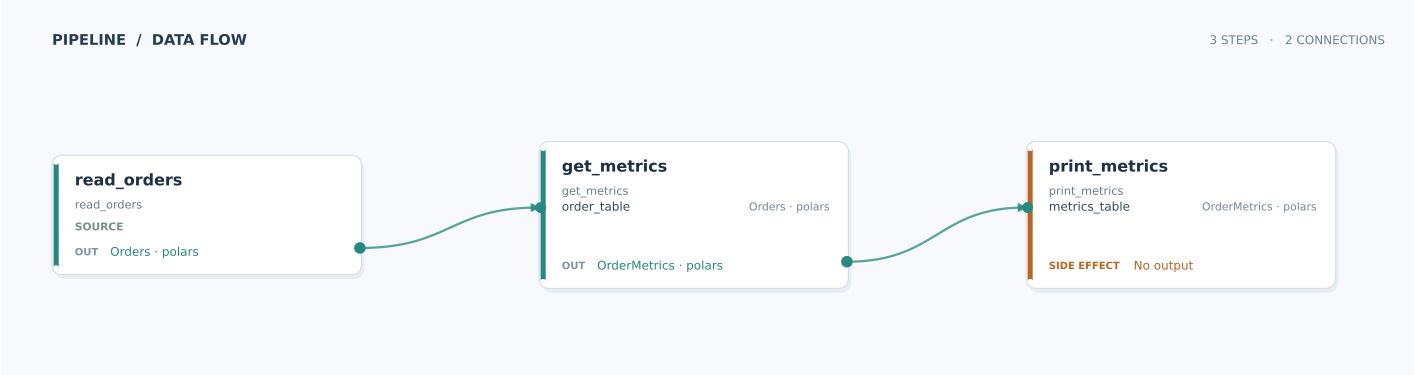
Open the full-size pipeline figure to inspect the step inputs and outputs.
Installation
Data joinery can work with Polars or PySpark. To install everything, use: