Pipelines
Pipelines allow you to chain together multiple transformations. The pipeline will validate that the output of each transformation is compatible with the input of the next one. After running a pipeline, see Inspecting Pipeline Runs to read a step's result. See Side effects to mark steps that a pipeline can skip during a run.
Defining a pipeline
To define a pipeline first create all your transformations and input/output schemas. Then create
your pipeline class and add each transformation as a Step. A Step represents a single
instance of that transformation within the pipeline. This distinction allows you to reuse the same
transformation multiple times within the same pipeline. Once the transformations have been added
you must connect them together using the connect method. This method will verify that the
transformations are compatible and can be connected together:
from dataclasses import dataclass
from typing import Annotated

import polars as pl

from data_joinery import Pipeline, Strict, transform


@dataclass
class A:
    a: str


@dataclass
class B:
    b: str


@transform
def read_data() -> Annotated[pl.LazyFrame, Strict(A)]:
    return pl.LazyFrame({"a": ["value"]})


@transform
def transform_data(
    a: Annotated[pl.LazyFrame, Strict(A)],
) -> Annotated[pl.LazyFrame, Strict(B)]:
    return a.rename({"a": "b"})


@transform
def write_data(
    b: Annotated[pl.LazyFrame, Strict(B)],
) -> None:
    print(b.collect())


order_metrics = Pipeline()
read_data_step = order_metrics.add_step(read_data)
transform_data_step = order_metrics.add_step(transform_data)
write_data_step = order_metrics.add_step(write_data)

order_metrics.connect(read_data_step, transform_data_step)
order_metrics.connect(transform_data_step, write_data_step)

order_metrics.run()
Outputs:
from dataclasses import dataclass
from typing import Annotated

from pyspark.sql import DataFrame, SparkSession

from data_joinery import Context, Pipeline, Strict, transform
from data_joinery.backends.spark import SparkContext


@dataclass
class A:
    a: str


@dataclass
class B:
    b: str


@transform
def read_data(
    spark: Annotated[SparkSession, Context()],
) -> Annotated[DataFrame, Strict(A)]:
    return spark.createDataFrame([{"a": "value"}])


@transform
def transform_data(
    a: Annotated[DataFrame, Strict(A)],
) -> Annotated[DataFrame, Strict(B)]:
    return a.withColumnRenamed("a", "b")


@transform
def write_data(
    b: Annotated[DataFrame, Strict(B)],
) -> None:
    b.show()


order_metrics = Pipeline(SparkContext)
read_data_step = order_metrics.add_step(read_data)
transform_data_step = order_metrics.add_step(transform_data)
write_data_step = order_metrics.add_step(write_data)

order_metrics.connect(read_data_step, transform_data_step)
order_metrics.connect(transform_data_step, write_data_step)

order_metrics.run(SparkContext(SparkSession.builder.getOrCreate()))
Outputs:
Connecting steps
You can also connect steps with upstream >> downstream or downstream << upstream.
For multiple steps, use upstream >> [first, second] to send one result to both steps,
or [first, second] >> downstream to provide two inputs to one step. Use connect(..., param="input_name") when a match is ambiguous.
Validating the pipeline
The pipeline will validate itself as you connect transformations. If there is a schema or type
incompatibility then you will see a PipelineConnectionError. An example of this is shown below:
import traceback
from dataclasses import dataclass
from typing import Annotated

import polars as pl

from data_joinery import Pipeline, Strict, transform
from data_joinery.pipeline import PipelineConnectionError


@dataclass
class A:
    a: str


@dataclass
class B:
    b: str


@dataclass
class C:
    c: str


@transform
def read_data() -> Annotated[pl.LazyFrame, Strict(A)]:
    return pl.LazyFrame({"a": ["value"]})


@transform
def transform_data(
    a: Annotated[pl.LazyFrame, Strict(A)],
) -> Annotated[pl.LazyFrame, Strict(B)]:
    return a.rename({"a": "b"})


@transform
def write_data(
    b: Annotated[pl.LazyFrame, Strict(C)],  # Our upstream does not produce schema C
) -> None:
    print(b.collect())


order_metrics = Pipeline()
read_data_step = order_metrics.add_step(read_data)
transform_data_step = order_metrics.add_step(transform_data)
write_data_step = order_metrics.add_step(write_data)

order_metrics.connect(read_data_step, transform_data_step)
try:
    order_metrics.connect(transform_data_step, write_data_step)
except PipelineConnectionError:
    print(traceback.format_exc(limit=1))
Outputs:
Traceback (most recent call last):
  File "/home/runner/work/data-joinery/data-joinery/docs_src/learn/pipelines/index/pipeline_connect_mismatch_polars.py", line 52, in <module>
    order_metrics.connect(transform_data_step, write_data_step)
data_joinery.pipeline.PipelineConnectionError: No compatible contract between steps 'transform_data' and 'write_data':
  Output of 'transform_data': polars LazyFrame[B] (strict)
  Inputs of 'write_data':
    'b': polars LazyFrame[C] (strict)
Change an input or output annotation so their DataFrame backends, types, and schema models match.
import traceback
from dataclasses import dataclass
from typing import Annotated

from pyspark.sql import DataFrame, SparkSession

from data_joinery import Context, Pipeline, Strict, transform
from data_joinery.backends.spark import SparkContext
from data_joinery.pipeline import PipelineConnectionError


@dataclass
class A:
    a: str


@dataclass
class B:
    b: str


@dataclass
class C:
    c: str


@transform
def read_data(
    spark: Annotated[SparkSession, Context()],
) -> Annotated[DataFrame, Strict(A)]:
    return spark.createDataFrame([{"a": "value"}])


@transform
def transform_data(
    a: Annotated[DataFrame, Strict(A)],
) -> Annotated[DataFrame, Strict(B)]:
    return a.withColumnRenamed("a", "b")


@transform
def write_data(
    b: Annotated[DataFrame, Strict(C)],  # Our upstream does not produce schema C
) -> None:
    b.show()


order_metrics = Pipeline(SparkContext)
read_data_step = order_metrics.add_step(read_data)
transform_data_step = order_metrics.add_step(transform_data)
write_data_step = order_metrics.add_step(write_data)

order_metrics.connect(read_data_step, transform_data_step)
try:
    order_metrics.connect(transform_data_step, write_data_step)
except PipelineConnectionError:
    print(traceback.format_exc(limit=1))
Outputs:
Traceback (most recent call last):
  File "/home/runner/work/data-joinery/data-joinery/docs_src/learn/pipelines/index/pipeline_connect_mismatch_spark.py", line 55, in <module>
    order_metrics.connect(transform_data_step, write_data_step)
data_joinery.pipeline.PipelineConnectionError: No compatible contract between steps 'transform_data' and 'write_data':
  Output of 'transform_data': spark DataFrame[B] (strict)
  Inputs of 'write_data':
    'b': spark DataFrame[C] (strict)
Change an input or output annotation so their DataFrame backends, types, and schema models match.
The pipeline will also fail to run if you have left a transformation 'dangling', meaning that it is missing a connection for one of it's upstream dependencies:
import traceback
from dataclasses import dataclass
from typing import Annotated

import polars as pl

from data_joinery import Pipeline, PipelineExecutionError, Strict, transform


@dataclass
class A:
    a: str


@dataclass
class B:
    b: str


@transform
def transform_data(
    a: Annotated[pl.LazyFrame, Strict(A)],
) -> Annotated[pl.LazyFrame, Strict(B)]:
    return a.rename({"a": "b"})


@transform
def write_data(
    b: Annotated[pl.LazyFrame, Strict(B)],
) -> None:
    print(b)


order_metrics = Pipeline()
transform_data_step = order_metrics.add_step(transform_data)
write_data_step = order_metrics.add_step(write_data)

order_metrics.connect(transform_data_step, write_data_step)

try:
    order_metrics.run()
except PipelineExecutionError:
    print(traceback.format_exc())
Outputs:
Traceback (most recent call last):
  File "/home/runner/work/data-joinery/data-joinery/docs_src/learn/pipelines/index/pipeline_connect_dangling_transformation_polars.py", line 41, in <module>
    order_metrics.run()
  File "/home/runner/work/data-joinery/data-joinery/src/data_joinery/pipeline.py", line 550, in run
    self._validate_source_steps(overrides, steps_to_run)
  File "/home/runner/work/data-joinery/data-joinery/src/data_joinery/pipeline.py", line 396, in _validate_source_steps
    raise PipelineExecutionError(
data_joinery.pipeline.PipelineExecutionError: Pipeline step 'transform_data' requires upstream inputs: a. Connect steps that produce these inputs.
import traceback
from dataclasses import dataclass
from typing import Annotated

from pyspark.sql import DataFrame

from data_joinery import Pipeline, PipelineExecutionError, Strict, transform


@dataclass
class A:
    a: str


@dataclass
class B:
    b: str


@transform
def transform_data(
    a: Annotated[DataFrame, Strict(A)],
) -> Annotated[DataFrame, Strict(B)]:
    return a.withColumnRenamed("a", "b")


@transform
def write_data(
    b: Annotated[DataFrame, Strict(B)],
) -> None:
    b.show()


order_metrics = Pipeline()
transform_data_step = order_metrics.add_step(transform_data)
write_data_step = order_metrics.add_step(write_data)

order_metrics.connect(transform_data_step, write_data_step)

try:
    order_metrics.run()
except PipelineExecutionError:
    print(traceback.format_exc())
Outputs:
Traceback (most recent call last):
  File "/home/runner/work/data-joinery/data-joinery/docs_src/learn/pipelines/index/pipeline_connect_dangling_transformation_spark.py", line 41, in <module>
    order_metrics.run()
  File "/home/runner/work/data-joinery/data-joinery/src/data_joinery/pipeline.py", line 550, in run
    self._validate_source_steps(overrides, steps_to_run)
  File "/home/runner/work/data-joinery/data-joinery/src/data_joinery/pipeline.py", line 396, in _validate_source_steps
    raise PipelineExecutionError(
data_joinery.pipeline.PipelineExecutionError: Pipeline step 'transform_data' requires upstream inputs: a. Connect steps that produce these inputs.
Detecting cycles
The pipeline will automatically detect cycles as you build it to ensure that the end result is runnable. The below example shows how the error is raised as you are connecting transformations:
import traceback
from dataclasses import dataclass
from typing import Annotated

import polars as pl

from data_joinery import Pipeline, Strict, transform
from data_joinery.pipeline import PipelineCycleError


@dataclass
class A: ...


@dataclass
class B: ...


@transform
def transform_data(
    _: Annotated[pl.LazyFrame, Strict(A)],
) -> Annotated[pl.LazyFrame, Strict(B)]: ...


@transform
def transform_data_back(
    _: Annotated[pl.LazyFrame, Strict(B)],
) -> Annotated[pl.LazyFrame, Strict(A)]: ...


order_metrics = Pipeline()
transform_data_step = order_metrics.add_step(transform_data)
transform_data_back_step = order_metrics.add_step(transform_data_back)

order_metrics.connect(transform_data_step, transform_data_back_step)
try:
    order_metrics.connect(transform_data_back_step, transform_data_step)
except PipelineCycleError:
    print(traceback.format_exc(limit=1))
Outputs:
Traceback (most recent call last):
  File "/home/runner/work/data-joinery/data-joinery/src/data_joinery/pipeline.py", line 335, in connect
    self._dag.add_edge(
rustworkx.DAGWouldCycle: Adding an edge would cycle

During handling of the above exception, another exception occurred:

Traceback (most recent call last):
  File "/home/runner/work/data-joinery/data-joinery/docs_src/learn/pipelines/index/pipeline_connect_cycle_polars.py", line 37, in <module>
    order_metrics.connect(transform_data_back_step, transform_data_step)
data_joinery.pipeline.PipelineCycleError: Connecting step 'transform_data_back' to 'transform_data' would create a cycle. Remove a connection so the steps form a DAG.
import traceback
from dataclasses import dataclass
from typing import Annotated

from pyspark.sql import DataFrame

from data_joinery import Pipeline, Strict, transform
from data_joinery.pipeline import PipelineCycleError


@dataclass
class A: ...


@dataclass
class B: ...


@transform
def transform_data(
    _: Annotated[DataFrame, Strict(A)],
) -> Annotated[DataFrame, Strict(B)]: ...


@transform
def transform_data_back(
    _: Annotated[DataFrame, Strict(B)],
) -> Annotated[DataFrame, Strict(A)]: ...


order_metrics = Pipeline()
transform_data_step = order_metrics.add_step(transform_data)
transform_data_back_step = order_metrics.add_step(transform_data_back)

order_metrics.connect(transform_data_step, transform_data_back_step)
try:
    order_metrics.connect(transform_data_back_step, transform_data_step)
except PipelineCycleError:
    print(traceback.format_exc(limit=1))
Outputs:
Traceback (most recent call last):
  File "/home/runner/work/data-joinery/data-joinery/src/data_joinery/pipeline.py", line 335, in connect
    self._dag.add_edge(
rustworkx.DAGWouldCycle: Adding an edge would cycle

During handling of the above exception, another exception occurred:

Traceback (most recent call last):
  File "/home/runner/work/data-joinery/data-joinery/docs_src/learn/pipelines/index/pipeline_connect_cycle_spark.py", line 37, in <module>
    order_metrics.connect(transform_data_back_step, transform_data_step)
data_joinery.pipeline.PipelineCycleError: Connecting step 'transform_data_back' to 'transform_data' would create a cycle. Remove a connection so the steps form a DAG.
Instance inputs/outputs
Pipeline steps can link transformations that accept and produce instance values. This allows you to pass around typed objects such as machine learning models, pandas DataFrames or any general Python object between steps in the pipeline. For instance contracts, the pipeline only validates that the runtime class is compatible between the input and output; it does not perform schema coercion.
This PySpark example reads data, engineers features, and trains an ML model. The trained model is passed as an instance value:
from dataclasses import dataclass
from typing import Annotated

from pyspark.ml.feature import VectorAssembler
from pyspark.ml.linalg import VectorUDT
from pyspark.ml.regression import LinearRegression, LinearRegressionModel
from pyspark.sql import DataFrame, SparkSession

from data_joinery import Context, Pipeline, Strict, transform
from data_joinery.backends.spark import SparkContext


@dataclass
class Housing:
    number_of_bedrooms: int
    square_footage: int
    price: float


@dataclass
class PreparedHousing:
    number_of_bedrooms: int
    square_footage: int
    price: float
    features: Annotated[object, VectorUDT()]


@transform
def read_data(
    spark: Annotated[SparkSession, Context()],
) -> Annotated[DataFrame, Strict(Housing)]:
    return spark.createDataFrame(
        [
            Housing(1, 650, 180_000.0),
            Housing(2, 900, 260_000.0),
            Housing(3, 1_200, 360_000.0),
            Housing(4, 1_600, 480_000.0),
        ]
    )


@transform
def prepare_features(
    housing: Annotated[DataFrame, Strict(Housing)],
) -> Annotated[DataFrame, Strict(PreparedHousing)]:
    return VectorAssembler(
        inputCols=["number_of_bedrooms", "square_footage"],
        outputCol="features",
    ).transform(housing)


@transform
def fit_model(
    housing: Annotated[DataFrame, Strict(PreparedHousing)],
) -> LinearRegressionModel:
    return LinearRegression(
        featuresCol="features", labelCol="price", regParam=1e-3
    ).fit(housing)


@transform
def print_coefficients(model: LinearRegressionModel) -> None:
    print(f"coefficients: {model.coefficients}")
    print(f"intercept: {model.intercept}")


housing_price_model = Pipeline(SparkContext)
read_data_step = housing_price_model.add_step(read_data)
prepare_features_step = housing_price_model.add_step(prepare_features)
fit_model_step = housing_price_model.add_step(fit_model)
print_coefficients_step = housing_price_model.add_step(print_coefficients)

housing_price_model.connect(read_data_step, prepare_features_step)
housing_price_model.connect(prepare_features_step, fit_model_step)
housing_price_model.connect(fit_model_step, print_coefficients_step)

housing_price_model.run(SparkContext(SparkSession.builder.getOrCreate()))
Outputs:
Generic type annotations such as list[str] are not supported for instance
values. Instance contracts validate runtime classes and do not inspect the contents of
generic containers. An unsupported annotation fails when the transform is defined:
import traceback

from data_joinery import transform

try:

    @transform
    def count_labels(labels: list[str]) -> int:
        return len(labels)

except TypeError:
    print(traceback.format_exc(limit=1))
Outputs:
Traceback (most recent call last):
  File "/home/runner/work/data-joinery/data-joinery/docs_src/learn/pipelines/index/pipeline_connect_instance_output_generic_type_failure.py", line 7, in <module>
    @transform
     ^^^^^^^^^
TypeError: Transform 'count_labels' parameter 'labels': InstanceContract requires an unsubscripted runtime class, got list[str]. Wrap structured values in a named class instead.
Wrap structured values in a named class when their internal types are important to the pipeline contract.
Similarly to best practice with context, you should avoid primitive types such as
int, datetime, etc and prefer either wrapper types or classes to be explicit on input/outputs:
from dataclasses import dataclass
from typing import Annotated

import polars as pl

from data_joinery import Pipeline, Strict, transform


@dataclass
class InputDataset:
    a: str
    b: str


@dataclass
class CollectedStats:
    distinct_a: int
    distinct_b: int


@transform
def read_data() -> Annotated[pl.LazyFrame, Strict(InputDataset)]:
    return pl.LazyFrame(
        [
            InputDataset("a1", "b1"),
            InputDataset("a2", "b2"),
            InputDataset("a3", "b2"),
            InputDataset("a4", "b2"),
        ]
    )


@transform
def collect_stats(
    input: Annotated[pl.LazyFrame, Strict(InputDataset)],
) -> CollectedStats:
    distinct_a = input.select("a").unique().collect().height
    distinct_b = input.select("b").unique().collect().height
    return CollectedStats(distinct_a=distinct_a, distinct_b=distinct_b)


@transform
def print_result(collected_stats: CollectedStats) -> None:
    print(collected_stats)


housing_price_model = Pipeline()
read_data_step = housing_price_model.add_step(read_data)
collect_stats_step = housing_price_model.add_step(collect_stats)
print_result_step = housing_price_model.add_step(print_result)

housing_price_model.connect(read_data_step, collect_stats_step)
housing_price_model.connect(collect_stats_step, print_result_step)

housing_price_model.run()
Outputs:
from dataclasses import dataclass
from typing import Annotated

from pyspark.sql import DataFrame, SparkSession

from data_joinery import Context, Pipeline, Strict, transform
from data_joinery.backends.spark import SparkContext


@dataclass
class InputDataset:
    a: str
    b: str


@dataclass
class CollectedStats:
    distinct_a: int
    distinct_b: int


@transform
def read_data(
    spark: Annotated[SparkSession, Context()],
) -> Annotated[DataFrame, Strict(InputDataset)]:
    return spark.createDataFrame(
        [
            InputDataset("a1", "b1"),
            InputDataset("a2", "b2"),
            InputDataset("a3", "b2"),
            InputDataset("a4", "b2"),
        ]
    )


@transform
def collect_stats(
    input: Annotated[DataFrame, Strict(InputDataset)],
) -> CollectedStats:
    distinct_a = input.select("a").distinct().count()
    distinct_b = input.select("b").distinct().count()
    return CollectedStats(distinct_a=distinct_a, distinct_b=distinct_b)


@transform
def print_result(collected_stats: CollectedStats) -> None:
    print(collected_stats)


housing_price_model = Pipeline(SparkContext)
read_data_step = housing_price_model.add_step(read_data)
collect_stats_step = housing_price_model.add_step(collect_stats)
print_result_step = housing_price_model.add_step(print_result)

housing_price_model.connect(read_data_step, collect_stats_step)
housing_price_model.connect(collect_stats_step, print_result_step)

housing_price_model.run(SparkContext(SparkSession.builder.getOrCreate()))
Outputs:
Don't crash your driver node!
Instance values are held in the process running the pipeline. In PySpark, collecting a large DataFrame into an instance value uses driver memory.
Visualizing data flow
Install the vis extra and call pipeline.visualize() after connecting the steps.
The figure places steps from left to right in flow order. Each card shows its step name,
transformation, inputs, and output type. Arrows point to the parameter that receives the
data. Teal marks DataFrames, purple marks instance values, and grey marks steps without
an output. Context dependencies appear inside the relevant step card.
This example splits the orders into two branches, combines them, then passes both DataFrames and a fitted model into later steps:
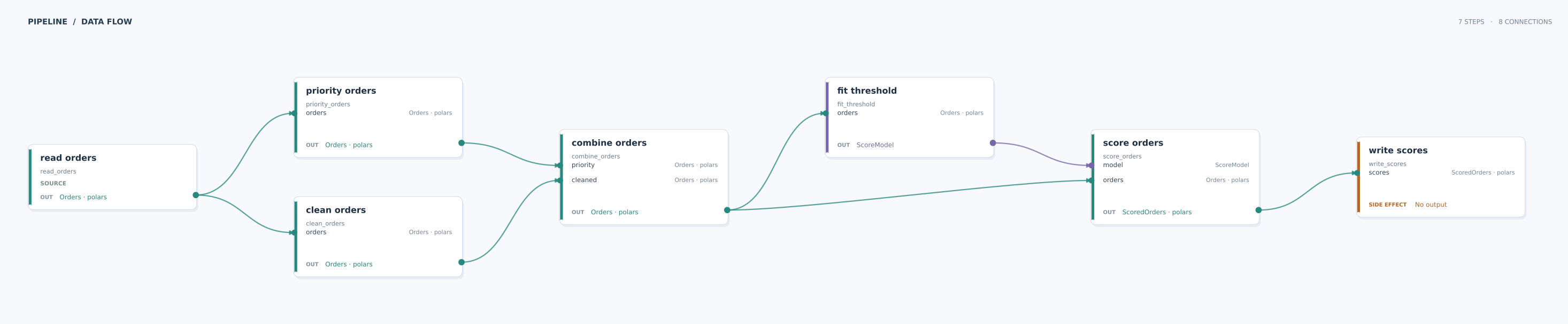
Open the full-size figure to inspect each input and output.
Pipeline used in the figure
"""A branch and join pipeline for the data flow figure."""

from dataclasses import dataclass
from typing import Annotated, cast

import polars as pl

from data_joinery import Pipeline, Strict, transform


@dataclass
class Orders:
    order_id: int
    amount: float


@dataclass
class ScoredOrders:
    order_id: int
    amount: float
    score: float


@dataclass
class ScoreModel:
    threshold: float


@transform
def read_orders() -> Annotated[pl.LazyFrame, Strict(Orders)]:
    return pl.LazyFrame({"order_id": [1, 2], "amount": [50.0, 150.0]})


@transform
def clean_orders(
    orders: Annotated[pl.LazyFrame, Strict(Orders)],
) -> Annotated[pl.LazyFrame, Strict(Orders)]:
    return orders.filter(pl.col("amount") >= 0)


@transform
def priority_orders(
    orders: Annotated[pl.LazyFrame, Strict(Orders)],
) -> Annotated[pl.LazyFrame, Strict(Orders)]:
    return orders.filter(pl.col("amount") > 100)


@transform
def combine_orders(
    cleaned: Annotated[pl.LazyFrame, Strict(Orders)],
    priority: Annotated[pl.LazyFrame, Strict(Orders)],
) -> Annotated[pl.LazyFrame, Strict(Orders)]:
    return pl.concat([cleaned, priority]).unique(
        subset=["order_id"], maintain_order=True
    )


@transform
def fit_threshold(
    orders: Annotated[pl.LazyFrame, Strict(Orders)],
) -> ScoreModel:
    mean = cast(float | None, orders.select(pl.col("amount").mean()).collect().item())
    if mean is None:
        raise ValueError("cannot fit a threshold from empty orders")
    return ScoreModel(threshold=mean)


@transform
def score_orders(
    orders: Annotated[pl.LazyFrame, Strict(Orders)],
    model: ScoreModel,
) -> Annotated[pl.LazyFrame, Strict(ScoredOrders)]:
    return orders.with_columns((pl.col("amount") / model.threshold).alias("score"))


@transform(side_effect=True)
def write_scores(
    scores: Annotated[pl.LazyFrame, Strict(ScoredOrders)],
) -> None:
    print(scores.collect())


order_pipeline = Pipeline()
read = order_pipeline.add_step(read_orders, "read orders")
clean = order_pipeline.add_step(clean_orders, "clean orders")
priority = order_pipeline.add_step(priority_orders, "priority orders")
combined = order_pipeline.add_step(combine_orders, "combine orders")
model = order_pipeline.add_step(fit_threshold, "fit threshold")
scored = order_pipeline.add_step(score_orders, "score orders")
written = order_pipeline.add_step(write_scores, "write scores")

order_pipeline.connect(read, clean)
order_pipeline.connect(read, priority)
order_pipeline.connect(clean, combined, param="cleaned")
order_pipeline.connect(priority, combined, param="priority")
order_pipeline.connect(combined, model)
order_pipeline.connect(combined, scored, param="orders")
order_pipeline.connect(model, scored, param="model")
order_pipeline.connect(scored, written)

order_pipeline.run()
Outputs:
Pass show=False to visualize() to get the Matplotlib figure without opening a window.
Use the returned figure's savefig() method to save a PNG or SVG. SVG works well for
large pipelines because you can zoom in without losing detail.